Checking Links
Find broken internal links before your visitors do.
Open ⚙️ Site Admin ▾ → 🔍 Check Links. WebHaste scans the content of every page, plus every menu, for links that don't lead to a real page or file in your project. The results are listed page by page, showing each broken link's text and address so you can fix it where it lives.
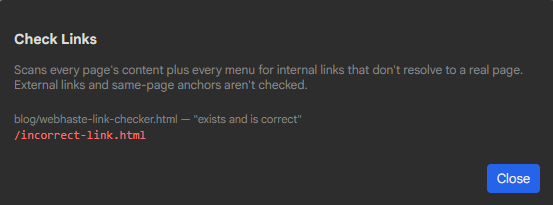
What it checks
- Links (
<a href>) on every page to other pages — written with or without.html, since hosts like Cloudflare Pages and Netlify serve both. - Links to files in your
assets/,scripts/andelements/folders, such as a PDF download. - Every item in every menu, including dropdown items. Menu links are reported once per menu, not once per page.
What it doesn't check
- External links (
https://…) — whether someone else's site is still up is outside WebHaste's control. mailto:andtel:links, and#anchorswithin a page.- Image sources — only links are scanned.
Common causes
- A typo in a menu or page link.
- A page that was renamed or deleted. If the old address is still out in the world, add a redirect as well as fixing your own links.
- A link to a page you haven't created yet.
- A file placed in a subfolder of
assets/— those folders are read one level deep only. See Images and Assets.
Check Links is a manual tool — it isn't part of Publish — so it's worth running before you publish a larger change. The Menus dialog also highlights broken menu links as you type; see Menus.
 Topics