WebHaste: The Perfect Platform for Educators and Classroom Projects

Teaching website development shouldn’t require a week of setup, a lab full of special machines, and a prayer that everyone’s environment stays in sync with yours.
WebHaste is a new website content management system that is ideal for teaching and learning web design. Students learn the basics of site management, and then branch out into modifying and writing code.
WebHaste is a browser-based extension that runs in Chrome (including on many Chromebooks), letting students build real multi-page websites — then package the project to turn in, or optionally publish directly to the Internet.
Less tool-wrangling ... more learning-by-building.
The classroom problem WebHaste solves
If you’ve taught web basics for any length of time, you’ve probably seen some of these friction points:
- Students get stuck on setup or technical issues before they ever ship a page.
- Editing, previewing and deploying requires multiple applications and servers.
- Small groups can't work on the same project simultaneously.
- Projects live inside a platform instead of becoming portable, ownable files.
- Grading turns into “does it run on my machine?” troubleshooting.
WebHaste leans the other direction: static sites, file-based workflow, and a visual editor + live preview that makes demos easy.
There are several website development activities that are better with WebHaste:
- Designing/coding HTML templates
- Managing sites and their content
- Deploying as a packaged folder or directly to the Internet
- Learning how to use AI agents to manage websites
- Learning how to use Git workflows
What WebHaste is (and what it isn’t)
WebHaste is a free, open-source, browser-based CMS for building static websites. It helps students create and manage pages, preview changes live, and export/deploy a finished site — without needing a server or database.
✅ What it is
- A free, open-source Chrome extension that lets students build multi-page static sites.
- A visual editing workflow that produces plain HTML files.
- Ability for small groups to work on a project concurrently.
- A practical way to teach structure: headings, navigation, links, assets, and clean URLs.
- A great platform for teaching client-side Javascript programming.
- A practical introduction to AI-assisted site management.
❌ What it isn’t (honest limitations)
- WebHaste is not a full dynamic app platform out of the box. If you are wanting students to learn server-side scripting languages like PHP or Python or Java, this is not the best environment.
- Static sites are fully rendered HTML pages that can use client-side Javascript elements. However, if you are wanting students to learn Javascript frameworks for page rendering, like React.js or Vue.js, WebHaste isn't a good option.
- Chromebook support depends on your environment. If your school blocks extension installs or file access, you may need IT approval first.
🥇Build a Real Website Classroom Project
What students do: Over four weeks, every student builds and ships a small multi-page website on a topic they choose (a mini exhibit, a club, a hobby, a local landmark). They write the content, structure it with real HTML, style it with real CSS, check it for accessibility and broken links, and hand in a site that opens in any browser with no server.
Grading Rubric and Checklist (PDF)
Download: webhaste-classroom-kit-teacher.zip
Download: webhaste-classroom-starter-student.zip
❤️ Why teachers like it
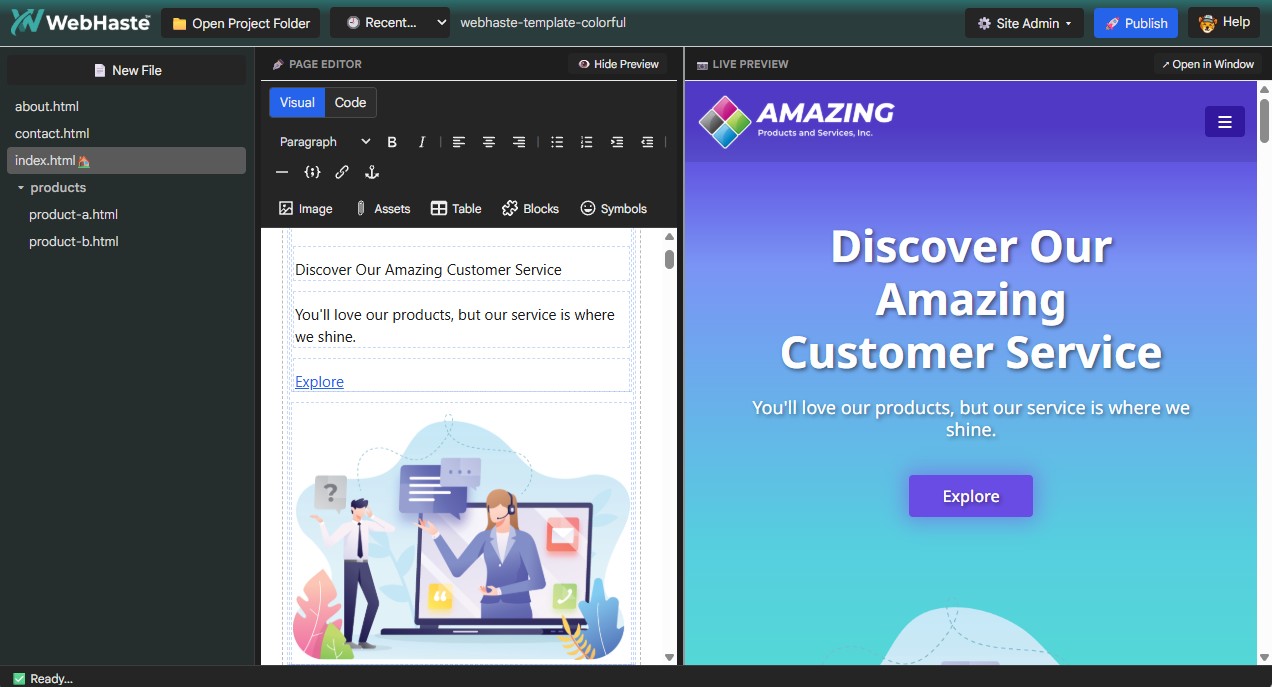
Chromebook-friendly (Chrome-first workflow)
WebHaste runs in Chrome, which makes it a strong fit for Chromebook-heavy classrooms — especially when you want students building real websites without the overhead of a traditional dev stack. No Homebrew or Apache server or other infrastructure needed. And since it runs 100% in the browser, students can work on practically any laptop or desktop, including Windows, Mac, Linux and ChromeOS.
Easy grading + student ownership
Because the output is just site files, you can grade student work and artifacts that make sense:
- A zip export
- A shared folder link
- An optional live URL (if publishing is allowed)
And students keep what they made — after the semester ends, after they graduate, whenever.
Learn HTML and CSS with Smart Code View
WebHaste's robust code editor is a great way for beginners to dive into markup and CSS. Unlike using Notepad, students benefit from:
- Colorized HTML code:
- Tags are magenta
- Attributes are green
- Parameters are yellow
- Content is white
- Automatic indentation
- Bracket and tag matching
- Real-time syntax checking
Why “real files” beats “walled garden” tools for learning
When students can see the actual HTML/CSS files and the complete site structure (pages, assets, folders), they learn transferable skills. They’re not just learning a tool — they’re learning the core standards of the web.
When they complete a project, students render a self-contained folder with all their files to turn in (or you can have them deploy to the Internet if you want).
A simple classroom workflow (pick your lane)
You can run WebHaste in a few different ways depending on your school’s policies and how much publishing freedom you want to allow.
Option A: Packaged Export + Zip (no accounts required)
This is the cleanest default for many classrooms: students build the site, export the files using WebHaste's "Packaged" deployment, zip the folder and submit via your LMS.
- Pros: no accounts required, easy to standardize, easy to archive
- Cons: no live URL unless you add publishing later
Option B: Folder share (Drive/LMS)
If your students can use a shared drive workflow, they can use the Packaged deployment and then submit a folder link (view-only) with their exported site.
- Pros: easy resubmits, easy teacher access
- Cons: depends on Drive policies and permissions
Option C: Publish link (Cloudflare Pages / Netlify)
If publishing is allowed, students can deploy static sites directly from WebHaste to free hosting and leave the class with a real portfolio link.
- Pros: instant portfolio, real-world deployment experience
- Cons: requires accounts and may require policy approval
What students learn
WebHaste is most useful when it introduces or reinforces fundamentals. The tool stays out of the way and the web concepts stay front-and-center.
Web fundamentals
- Pages and navigation (and why structure matters)
- Headings and hierarchy (H1 → H2 → H3)
- Links, relative paths, and keeping assets organized
- Writing for the web: scannable sections, clear labels, readable layouts
Accessibility + QA habits
- Alt text on images
- Descriptive link text (not “click here” everywhere)
- Meta descriptions and Schema markup
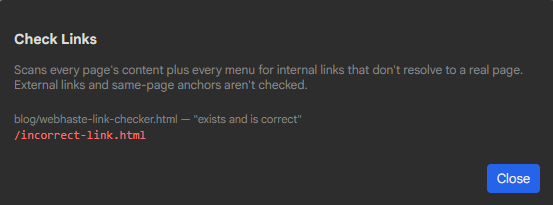
- Basic broken-link checking before submission
Level-up path: Bootstrap/Tailwind + AI as a collaborator
Once students have the basics, you can introduce an optional “real-world” upgrade path:
- Start with plain HTML/CSS
- Upgrade to a starter template using Bootstrap or Tailwind
- Use AI as a collaborator for refactors, content drafts, or accessibility improvements (with your rules)
Starter projects, templates, and tutorials
You don’t need to build everything from scratch. Starter projects give students a clean runway and let you focus on the lesson.
Starter templates
Starter templates are available here:
Starter templates: https://github.com/orgs/WebHaste/repositories
YouTube tutorials (helpful for pacing)
If you want students to follow along (or you want a backup plan when you lose 10 minutes to Wi-Fi), tutorials are available here:
YouTube: https://www.youtube.com/@destinationtoolbox
Ready to try it with your next class?
If you want a classroom-friendly way to teach real website fundamentals—without the setup drama—start here:
 Recent Articles